Another fix is to update your menu using the latest User Interface.
If your menu not compatible with the User Interface(purchased before 2009), please contact us.
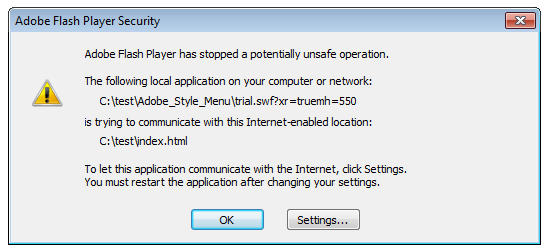
- If you see the message, when you hover mouse over the menu follow the steps
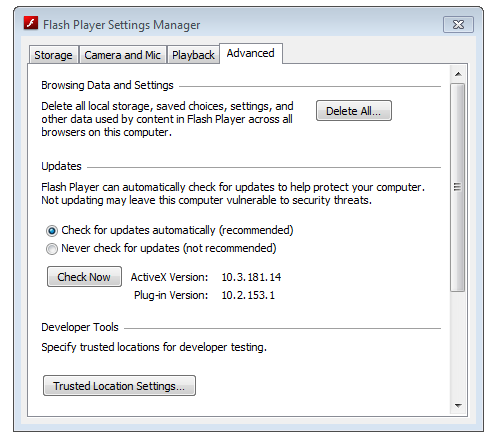
- Click on the "Settings..." button in the message window, select "Advanced" tab
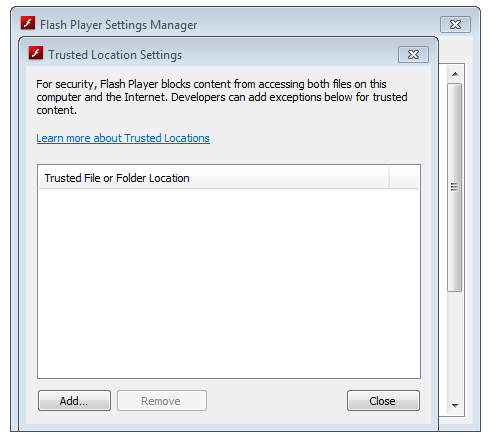
- Click on the "Trusted Location Settings" button in the "Developer Tools" section.
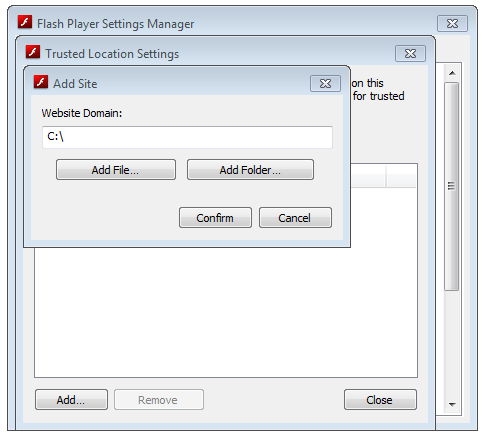
- Click "Add", then browse for folder or choose the whole disk.
It will help to test the menu locally, however when you test online there is no need to change any settings in the flash player.
- Please, ignore the message. There is no problem with IE.
Dreamweaver tries to convert all Flash Object tags to its own scripts and fails usually ...
However it is not a problem that it fails - you can simply ignore this message.
Our menus work perfectly in all modern versions of Internet Explorer.
- You can use any search script with GET parameters, any public search engine for example, Google:
"http://www.google.com/search?q=" - google search in Web
"http://www.google.com/search?sitesearch=yourDomainName&q=" - search on your web site
or Yahoo:
"http://search.yahoo.com/search?p=" - Yahoo search in Web.
There is only one rule for any search engine: put the search query parameter to the end of the link ("http://www.someSearchScript?query=") the search request will be added to the end of the link, for example: searching of "flash menu" ("http://www.someSearchScript?query=flash menu")
Example of the button code:
	In the function "AC_FL_RunContent"

	AC_FL_RunContent(
			'wmode','transparent',
			'codebase', 'http://download.macromedia.com/pub/shockwave/cabs/flash/swflash.cab#version=7,0,0,0',
			'width', '720',
			'height', '925',.....
- We recommend to create a simple html menu for Apple mobile devices. Following javascript detects iPhone/iPod/iPad and replaces flash menu with simple HTML menu.
//- don't apply to f-source menus! //- All in one line, without line breaks!
Example of correct code:
<script>flashFix('<object ... <param ... <param ... </object>');</script>
Example of incorrect code:
<script>flashFix('<object ...
<param ...
<param ...
</object>');</script>
- By default the maximum height of submenus is limited by 450px, but you can extend it:
- open your copy of the script "ActiveContentDropDown.js" or
"ActiveContentDropDownWide.js"
(your page should have a link to the script in the header) (the JS file
is included in a menu package)
- find the string "areah=450"
- set desired value, for example "areah=900"
- Yes, you need to type in target field instead of "_parent" - the name of your content frame.
Don't confuse the name of frame file (mainFrame.html) and its parameter "name" (<frame src="mainFrame.html" name="bottomFrame">)
- Replace all "http://" with "https://" in the page links that load images and source files. Don't forget about this codebase="https://download.macromedia.com/pub/shockwave/cabs/flash/swflash.cab#version=9,0,28,0".
- This message appears only during local testing, when you publish the menu on server, everything will be ok. To get rid of this message you need to change Flash player settings for your PC using this Macromedia Flash Player Setting Manager . (Choose "Always allow" or Edit location.. => Add location...)
- They need to have Flash Player installed in a browser, if they don't, installation starts automatically. But 99% users already have it installed. See Detailed Survey from Macromedia(Adobe)
Our flash menus require flash player version 6 or higher.